
- Home
- About
- Features
-
Software SolutionsProject Management CRM System Inventory ManagerDevelopment ToolsCode Editor API Testing Tool Database Manager
- News
- Contact
Automations / SwiftClaim / Documentation
Developer documentation: webhook setup, app configuration, and SMS pattern customization.
SwiftClaim is an Android app that runs silently in the background and monitors your SMS inbox for mobile money payment notifications. When a matching payment SMS is detected, it extracts the transaction data and HTTP POSTs it as JSON to your webhook URL - in real time.
You receive clean, structured data and do whatever you want with it update a database, credit a wallet, trigger an alert, mark an order as paid, and more.
The flow is straightforward:
The app runs as a persistent foreground service - similar to how WhatsApp or Google Maps keeps running in the background. It survives app close, screen off, and phone reboot.
SwiftClaim V3 requires a valid App Key before it can process any SMS. Each key is unique per customer and locks to a single device on first use.
Download the latest SwiftClaim V3 APK from your order confirmation email or the SwiftClaim page . Install it on your Android device (enable Install from unknown sources if prompted).
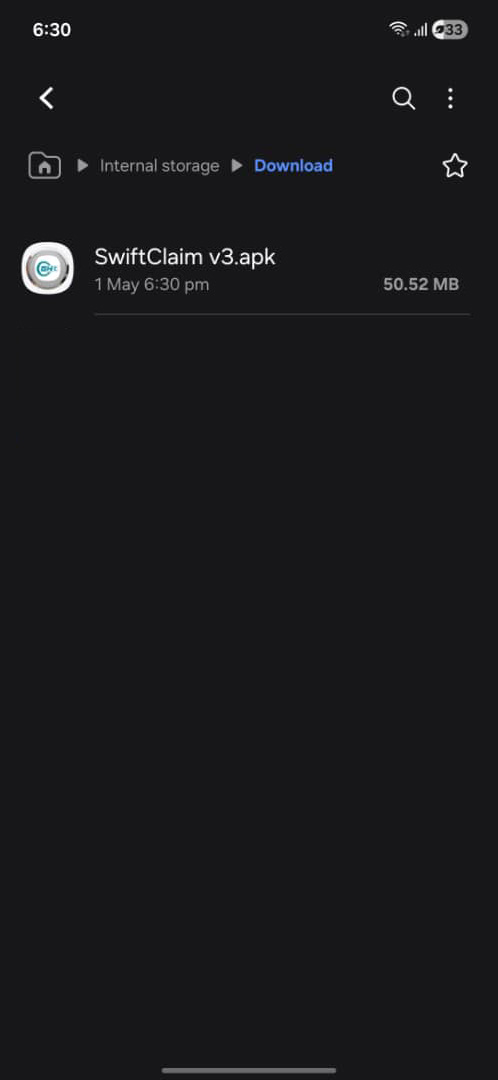
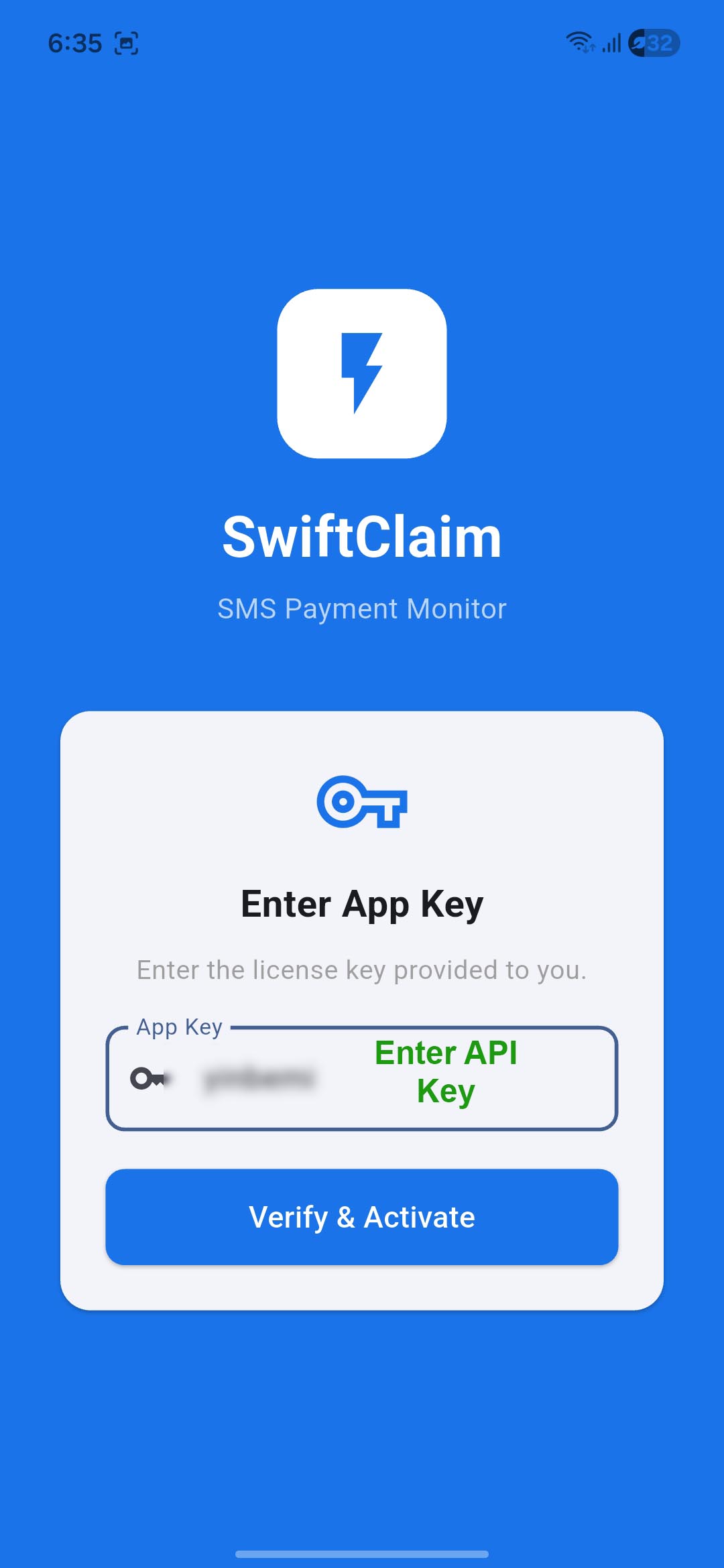
On first launch, the app will prompt you to enter your App Key. Paste the key exactly as provided - it is case-sensitive. The key is verified against the Marcbrain server and then bound permanently to your device ID.
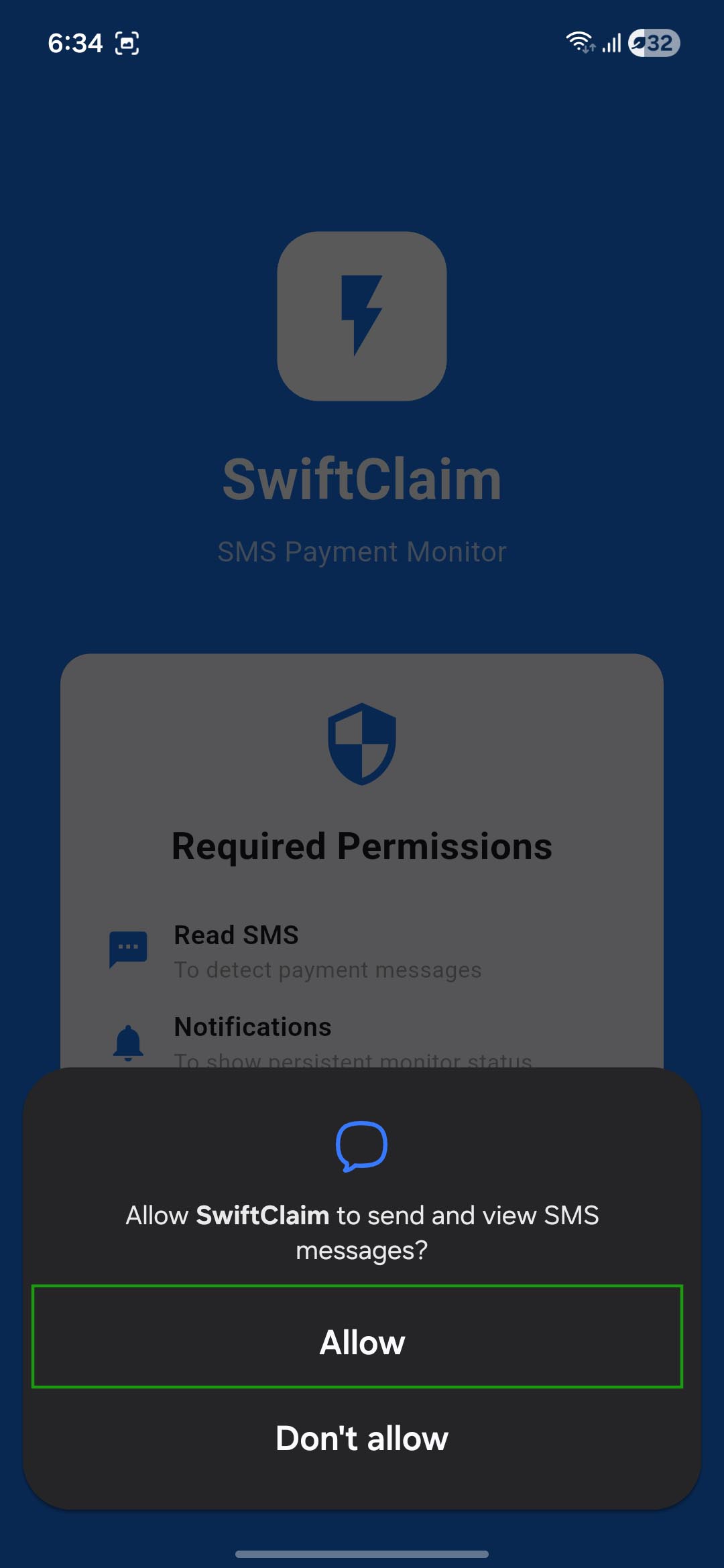
SwiftClaim requires permission to read SMS messages. When prompted, tap Allow. Without this permission the app cannot detect incoming payment messages.
Your webhook URL is the HTTPS endpoint on your server where SwiftClaim will POST payment data. You must set this before the app can send anything.
In the app, tap the Settings icon (top-right or bottom navigation, depending on your version).
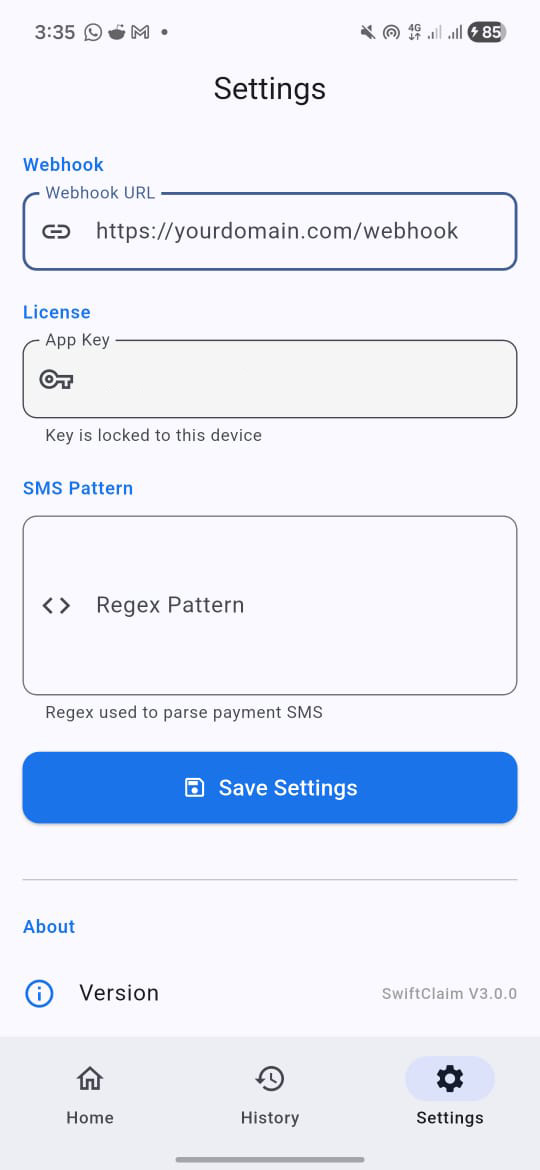
Find the Webhook URL field. Paste your full HTTPS endpoint, for example:
You can also add a secret token as a query parameter for added security:
Tap Save. The app will confirm the URL is stored. You can test delivery using the Send Test button (if available) or by triggering a manual scan.
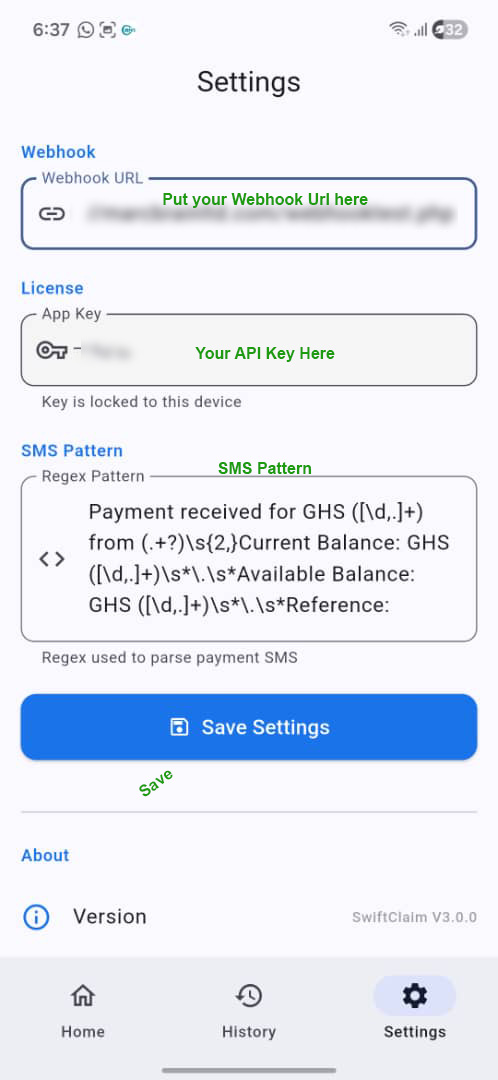
Tap Save. The app will confirm the URL is stored. You can test delivery using the Send Test button (if available) or by triggering a manual scan.
SwiftClaim uses a regex pattern to identify and extract data from payment SMS messages. A default pattern is included, but you can customize it for your bank or mobile money provider.
The default pattern matches messages in this format:
Default regex:
Capture groups (in order): amount, from, current_balance, available_balance, reference, transaction_id, transaction_fee.
To set a custom pattern, go to Settings → SMS Pattern, clear the default regex, and paste your own. Make sure your regex has the same 7 capture groups in the same order, or the extracted data will be misaligned.
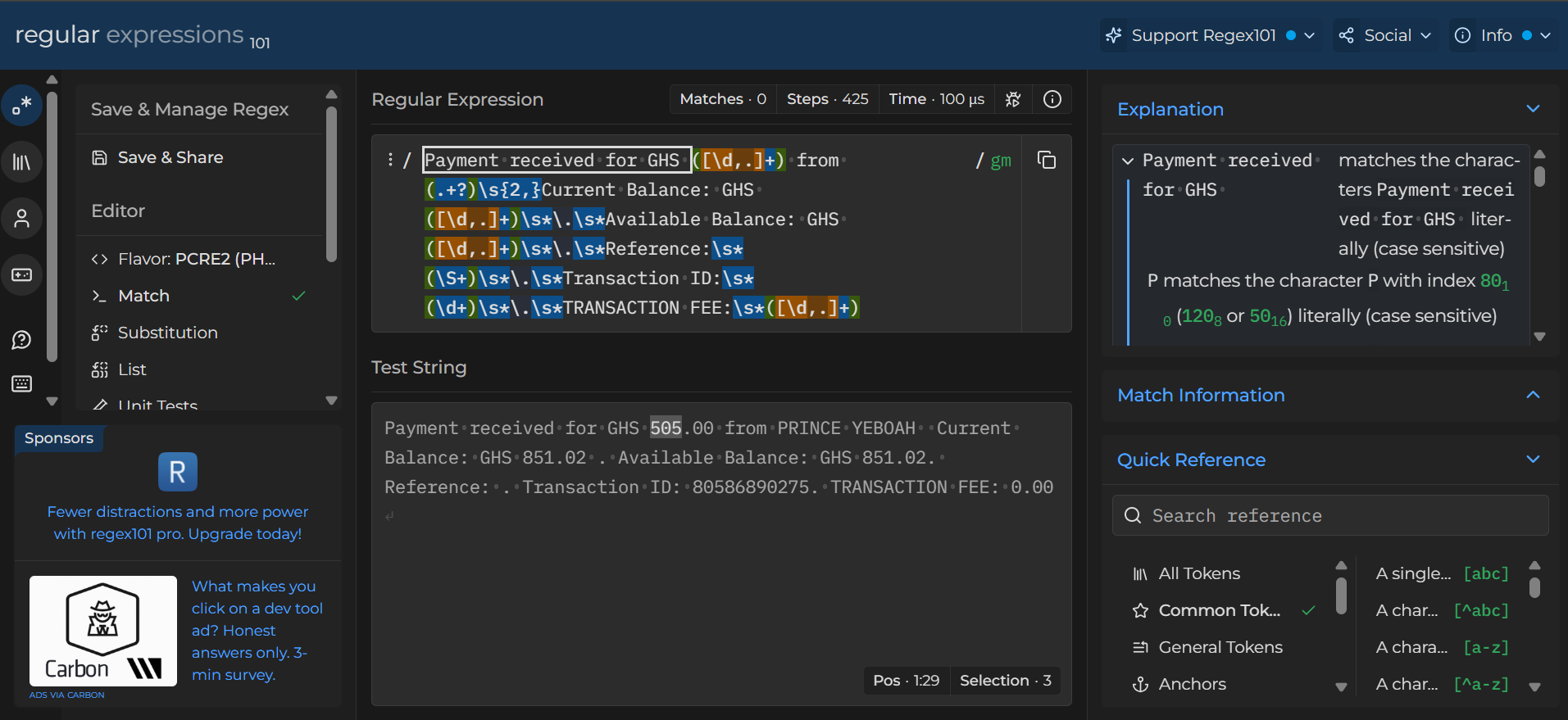
SwiftClaim V3 runs as a persistent foreground service. This means:
You can also trigger a manual scan from the app's main screen at any time to process any unprocessed messages in your inbox.
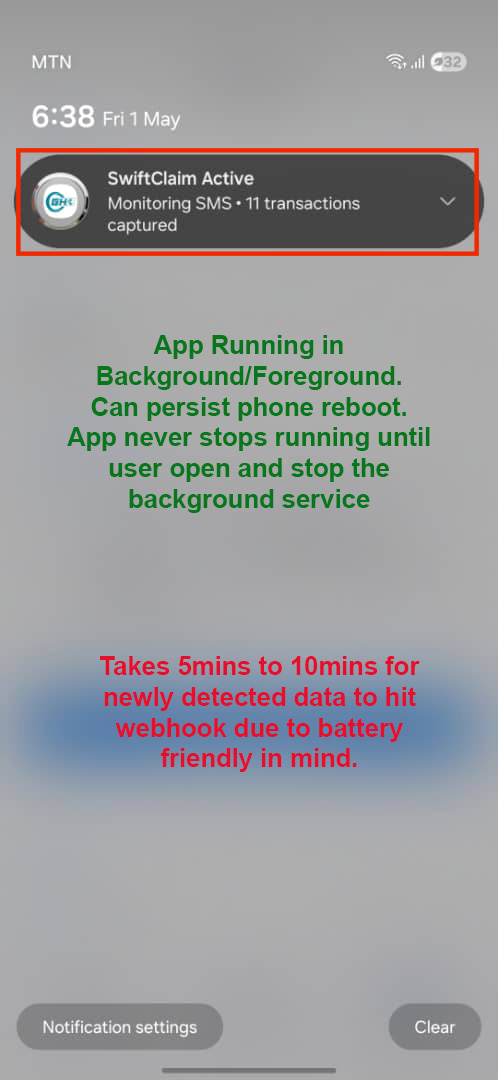
When a payment SMS is detected, SwiftClaim sends a POST request to your webhook URL with the following JSON body:
| Field | Type | Description |
|---|---|---|
event |
string | Always "payment_received" |
timestamp |
string | ISO 8601 datetime of when the SMS was detected |
data.amount |
string | Amount received (GHS), e.g. "310.00" |
data.from |
string | Sender name as it appears in the SMS |
data.current_balance |
string | Account current balance after transaction |
data.available_balance |
string | Account available balance after transaction |
data.reference |
string | Payment reference number provided by sender |
data.transaction_id |
string | Unique transaction ID from the network — use this to detect duplicates |
data.transaction_fee |
string | Fee charged for the transaction |
Your webhook must be a publicly accessible HTTPS URL that accepts
POST requests with Content-Type: application/json
and returns HTTP 200 on success. Choose your language below:
<?php
// webhook.php

header('Content-Type: application/json');

// Optional: validate secret token
$token = $_GET['token'] ?? '';
if ($token !== 'your_secret_token') {
    http_response_code(403);
    echo json_encode(['status' => 'forbidden']);
    exit;
}

// Read raw payload
$payload = json_decode(file_get_contents('php://input'), true);

if (!$payload || ($payload['event'] ?? '') !== 'payment_received') {
    http_response_code(400);
    echo json_encode(['status' => 'error', 'message' => 'Invalid payload']);
    exit;
}

$data = $payload['data'] ?? [];

$amount         = $data['amount'] ?? null;
$from           = $data['from'] ?? null;
$txn_id         = $data['transaction_id'] ?? null;
$current_bal    = $data['current_balance'] ?? null;
$reference      = $data['reference'] ?? null;
$fee            = $data['transaction_fee'] ?? null;

// TODO: Check for duplicate transaction
// e.g. SELECT COUNT(*) FROM payments WHERE transaction_id = '$txn_id'

// TODO: Your logic here
// e.g. insert into DB, credit wallet, notify staff, mark order paid

// Log to file
file_put_contents(
    __DIR__ . '/webhook_log.txt',
    "[" . date("Y-m-d H:i:s") . "] GHS $amount from $from | TxnID: $txn_id" . PHP_EOL,
    FILE_APPEND
);

http_response_code(200);
echo json_encode(['status' => 'received']);
const express = require('express');
const app = express();
app.use(express.json());

app.post('/webhook', (req, res) => {
  // Optional: validate secret token
  const token = req.query.token;
  if (token !== 'your_secret_token') {
    return res.status(403).json({ status: 'forbidden' });
  }

  const { event, timestamp, data } = req.body;

  if (event !== 'payment_received') {
    return res.status(400).json({ status: 'error', message: 'Invalid event' });
  }

  const {
    amount,
    from,
    transaction_id,
    current_balance,
    reference,
    transaction_fee
  } = data;

  // TODO: check duplicate by transaction_id
  // TODO: your logic — update DB, credit wallet, etc.

  console.log(`[${timestamp}] GHS ${amount} from ${from} | TxnID: ${transaction_id}`);

  res.status(200).json({ status: 'received' });
});

app.listen(3000, () => console.log('Webhook server running on port 3000'));
from flask import Flask, request, jsonify
import logging

app = Flask(__name__)
logging.basicConfig(level=logging.INFO)

SECRET_TOKEN = 'your_secret_token'

@app.route('/webhook', methods=['POST'])
def webhook():
    # Optional: validate secret token
    token = request.args.get('token', '')
    if token != SECRET_TOKEN:
        return jsonify({'status': 'forbidden'}), 403

    payload = request.get_json(silent=True)

    if not payload or payload.get('event') != 'payment_received':
        return jsonify({'status': 'error', 'message': 'Invalid payload'}), 400

    data = payload.get('data', {})

    amount       = data.get('amount')
    from_name    = data.get('from')
    txn_id       = data.get('transaction_id')
    balance      = data.get('current_balance')
    reference    = data.get('reference')
    fee          = data.get('transaction_fee')
    timestamp    = payload.get('timestamp')

    # TODO: check duplicate by txn_id
    # TODO: your logic — update DB, credit wallet, etc.

    logging.info(f"[{timestamp}] GHS {amount} from {from_name} | TxnID: {txn_id}")

    return jsonify({'status': 'received'}), 200

if __name__ == '__main__':
    app.run(port=5000)
// routes/api.php
        Route::post('/webhook/swiftclaim', [SwiftClaimWebhookController::class, 'handle']);

        // ---

        // app/Http/Controllers/SwiftClaimWebhookController.php
        namespace App\Http\Controllers;

        use Illuminate\Http\Request;
        use App\Models\Payment;
        use Illuminate\Support\Facades\Log;

        class SwiftClaimWebhookController extends Controller
        {
            public function handle(Request $request)
            {
                // Optional: validate secret token
                if ($request->query('token') !== config('services.swiftclaim.secret')) {
                    return response()->json(['status' => 'forbidden'], 403);
                }

                $payload = $request->json()->all();

                if (empty($payload) || ($payload['event'] ?? '') !== 'payment_received') {
                    return response()->json(['status' => 'error'], 400);
                }

                $data = $payload['data'] ?? [];

                // Prevent duplicate processing
                if (Payment::where('transaction_id', $data['transaction_id'])->exists()) {
                    return response()->json(['status' => 'duplicate'], 200);
                }

                // Save to DB
                Payment::create([
                    'amount'           => $data['amount'],
                    'from'             => $data['from'],
                    'transaction_id'   => $data['transaction_id'],
                    'current_balance'  => $data['current_balance'],
                    'reference'        => $data['reference'],
                    'transaction_fee'  => $data['transaction_fee'],
                    'received_at'      => now(),
                ]);

                Log::info('SwiftClaim payment received', $data);

                return response()->json(['status' => 'received'], 200);
            }
        }

        // ---

        // Don't forget to exclude this route from CSRF in:
        // app/Http/Middleware/VerifyCsrfToken.php
        // protected $except = ['api/webhook/swiftclaim'];
// Add to your theme's functions.php or a custom plugin file.
        // Registers a REST API endpoint:
        // POST https://yourdomain.com/wp-json/swiftclaim/v1/webhook

        add_action('rest_api_init', function () {
            register_rest_route('swiftclaim/v1', '/webhook', [
                'methods'             => 'POST',
                'callback'            => 'swiftclaim_handle_webhook',
                'permission_callback' => '__return_true',
            ]);
        });

        function swiftclaim_handle_webhook(WP_REST_Request $request) {
            // Optional: validate secret token
            $token = $request->get_param('token');
            if ($token !== 'your_secret_token') {
                return new WP_REST_Response(['status' => 'forbidden'], 403);
            }

            $payload = $request->get_json_params();

            if (empty($payload) || ($payload['event'] ?? '') !== 'payment_received') {
                return new WP_REST_Response(['status' => 'error'], 400);
            }

            $data = $payload['data'] ?? [];

            $amount      = sanitize_text_field($data['amount'] ?? '');
            $from        = sanitize_text_field($data['from'] ?? '');
            $txn_id      = sanitize_text_field($data['transaction_id'] ?? '');
            $balance     = sanitize_text_field($data['current_balance'] ?? '');
            $reference   = sanitize_text_field($data['reference'] ?? '');
            $fee         = sanitize_text_field($data['transaction_fee'] ?? '');
            $timestamp   = sanitize_text_field($payload['timestamp'] ?? '');

            // Check for duplicate
            global $wpdb;
            $table = $wpdb->prefix . 'swiftclaim_payments';
            $exists = $wpdb->get_var(
                $wpdb->prepare("SELECT COUNT(*) FROM $table WHERE transaction_id = %s", $txn_id)
            );
            if ($exists > 0) {
                return new WP_REST_Response(['status' => 'duplicate'], 200);
            }

            // Insert into custom table
            $wpdb->insert($table, [
                'amount'           => $amount,
                'sender'           => $from,
                'transaction_id'   => $txn_id,
                'current_balance'  => $balance,
                'reference'        => $reference,
                'transaction_fee'  => $fee,
                'received_at'      => current_time('mysql'),
            ]);

            // Optional: send admin email
            // wp_mail(get_option('admin_email'), 'New Payment via SwiftClaim', "GHS $amount from $from");

            return new WP_REST_Response(['status' => 'received'], 200);
        }

        // ---

        // Create DB table on plugin activation:
        function swiftclaim_create_table() {
            global $wpdb;
            $table = $wpdb->prefix . 'swiftclaim_payments';
            $charset = $wpdb->get_charset_collate();
            $sql = "CREATE TABLE IF NOT EXISTS $table (
                id bigint(20) NOT NULL AUTO_INCREMENT,
                amount varchar(20) NOT NULL,
                sender varchar(100) NOT NULL,
                transaction_id varchar(50) NOT NULL UNIQUE,
                current_balance varchar(20),
                reference varchar(50),
                transaction_fee varchar(20),
                received_at datetime DEFAULT CURRENT_TIMESTAMP,
                PRIMARY KEY (id)
            ) $charset;";
            require_once(ABSPATH . 'wp-admin/includes/upgrade.php');
            dbDelta($sql);
        }
        register_activation_hook(__FILE__, 'swiftclaim_create_table');
?token=abc123) and validate it on every request. Reject any call that doesn't match.transaction_id, always check if you've already processed this ID before taking action. The app may retry a failed delivery, and you never want to credit the same payment twice.200 quicklydo heavy processing (DB writes, email notifications) asynchronously or in a queue. A slow response may cause the app to treat the delivery as failed.transaction_id twice should have no harmful side effect. This protects you if a manual resend occurs.
Built and maintained by MarcBrain Ltd.